Text On Youtube
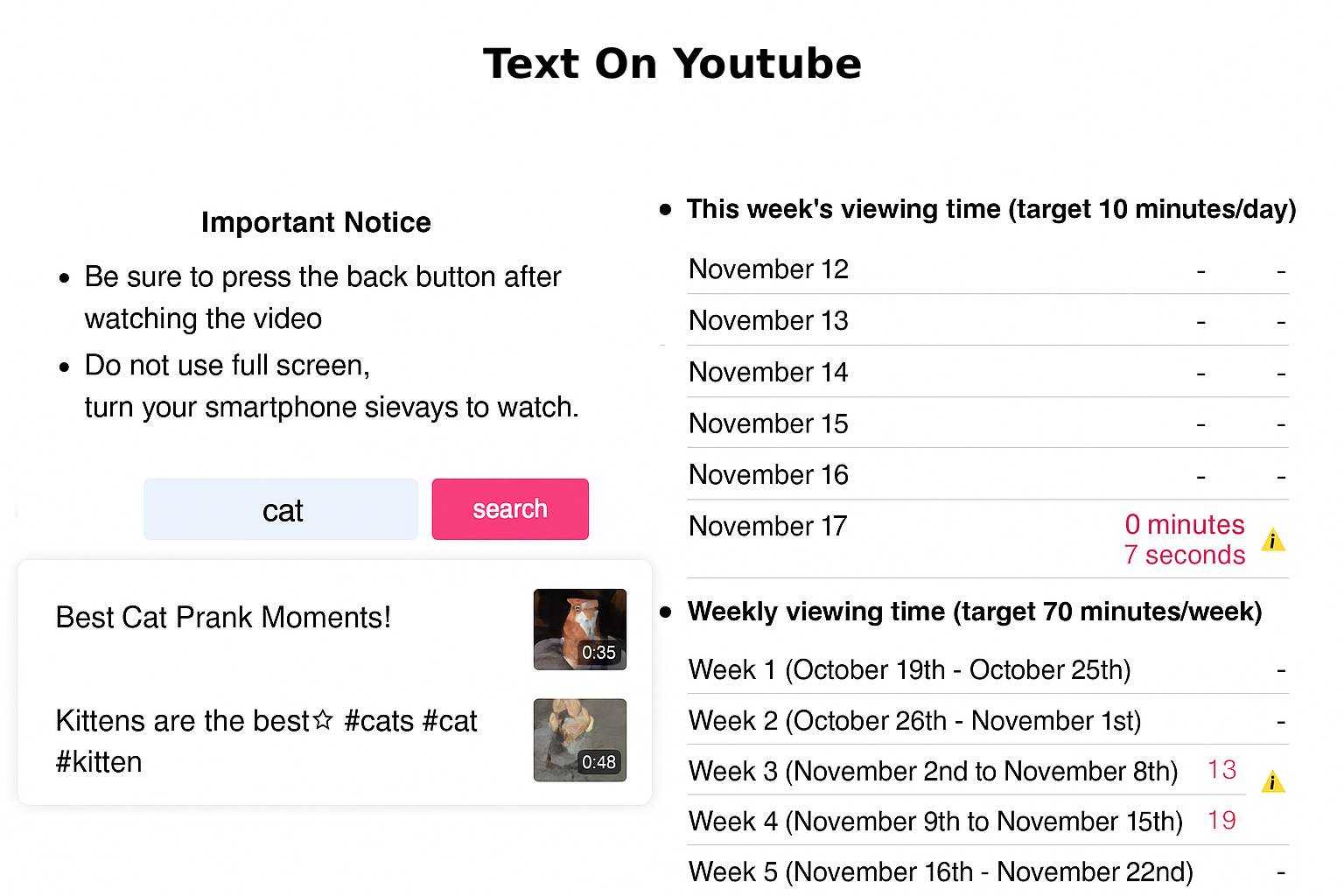
This project is a complete Video Watching Detection and Analytics Web Application designed to accurately track how many times each video is viewed across multiple user accounts. The system monitors real-time viewing behavior, including repeated plays, and calculates daily, weekly, and monthly watch counts for each video.
To ensure accurate detection, a visual text indicator is displayed on the video screen whenever a watch event occurs. Additionally, an invisible overlay layer is placed over the video player to prevent users from tapping suggested videos or interacting with YouTube-style recommendations after the video ends.
The application includes a powerful admin panel where administrators can:
- Download CSV reports for any selected day, showing total watch counts across all users.
- Upload user lists via CSV to quickly update or manage user accounts.
- View real-time summaries and consolidated analytics for the entire platform.
1. Problem Statement
Modern digital platforms depend on accurate user-engagement analytics to understand viewing behavior, content performance, and user activity across multiple accounts. However, small to medium-scale platforms often face significant limitations:
- Inaccurate or incomplete tracking of how many times a video is watched or replayed.
- Lack of consolidated reporting when multiple users access the same content.
- No automated analytics, forcing administrators to rely on manual calculations for daily, weekly, or monthly summaries.
- Poor data management tools, with no reliable CSV import/export features for user or report handling.
- Limited video interaction control, such as preventing users from opening YouTube suggested videos.
These issues create data gaps, reduce visibility, and make it difficult for platforms to make informed, data-driven decisions.
2. Solution
To overcome these challenges, a complete Video Monitoring and Engagement Analytics Web Application was designed and implemented. This solution provides end-to-end watch tracking, automated analytics, and easy data management—packaged inside an intuitive admin panel.
Key Features
- Accurate detection of every video watch, replay, and completion event.
- Automated daily, weekly, and monthly watch count calculations.
- Aggregated analytics across all user accounts.
- Admin panel with CSV download for any specific day.
- User list upload through CSV with automatic parsing and display.
- Protection against unwanted user interactions by using an invisible overlay to block suggested videos.
- Clean and easy-to-navigate admin dashboard.
This solution is scalable and ideal for educational platforms, private content libraries, internal training systems, and subscription-based video portals.
3. Way of Solution
A structured, modular, and data-driven approach was followed to build the system:
a. Real-Time Watch Event Tracking
- Integrated event listeners into the video player.
- Detected play, pause, completion, and replay actions.
- Captured details such as video ID, user ID, timestamps, and watch durations.
- Added an invisible overlay to block clicks on suggested YouTube videos.
b. Automated Data Aggregation
All watch events are stored in the database and automatically processed to compute:
- Total watch count per video
- Daily analytics
- Weekly and monthly summaries
- Combined results across all user accounts
c. CSV Reporting Engine
- Admin can pick any date and generate a CSV file of all watch counts for that day.
- Cleanly formatted, ready for analysis or download.
d. User List Import
- CSV upload system for adding/updating user accounts.
- Automatic file parsing and validation.
- Instant display on the admin dashboard.
e. Admin Dashboard
- Simple and organized UI.
- Real-time statistics with filtering, sorting, and quick actions.
- Secure access for managing user data and watch reports.
4. Development Process
1. Requirement Analysis
- Identified the need for accurate watch tracking and simplified analytics.
- Analyzed CSV handling, data flow, and reporting requirements.
2. System Architecture
Designed a modular structure consisting of:
- Frontend video tracking layer
- Database for watch/event/user data
- Admin panel for reporting and management
3. Frontend Implementation
- Added video event listeners for tracking views and interactions.
- Implemented an invisible overlay to block interaction with YouTube recommendations.
4. Backend Development
- Implemented watch event recording and analytics logic.
- Added CSV handling (import/export).
5. Data Processing
Created algorithms for:
- Daily/Weekly/Monthly summaries
- Total watch counts per video
- Unique and repeated user interactions
- Efficient aggregation across large datasets
6. Admin Panel
- UI built with structured cards, tables, and buttons.
- Implemented report generation, user list upload, and view filters.
7. Testing & Optimization
Performed:
- Functional testing
- Stress testing with bulk data
- Validation of duplicate entries and inaccurate watch events
- CSV error handling tests
8. Deployment
- Hosted on Apache/Nginx environment
- Configured environment variables, security rules, and performance optimizations.
5. Challenges
Building this system involved solving several technical and architectural challenges:
- Ensuring accurate watch detection during fast-forwarding, rewinds, or page refreshes.
- Handling simultaneous watch events from multiple users.
- Preventing suggested video clicks with an overlay without breaking UI behavior.
- Designing efficient aggregation logic for daily/weekly/monthly totals.
- Avoiding duplicate logs from reloads or network interruptions.
- Implementing robust CSV import/export without formatting errors.
- Maintaining performance while processing large datasets.
Each challenge was addressed through optimized tracking logic, clean API architecture, and rigorous debugging.
6. Technology Stack
Frontend
- HTML, CSS, JavaScript
- Video Player Event APIs
- Fetch/AJAX for sending watch events
- Bootstrap / TailwindCSS for admin UI
- Optional: jQuery for admin panel interactions
Backend
- PHP for APIs and processing logic
- Custom algorithms for watch-event analysis
- CSV handling (imports + exports)
Database
- MySQL / MariaDB
- Optimized tables for watch logs and user data
CSV Management
- PHP built-in CSV parsers
- Custom validation and formatting logic
Deployment
- Apache / Nginx server
- Shared hosting or cloud environment
Conclusion
This project successfully delivers a robust, end-to-end solution for monitoring and analyzing video-watching behavior across multiple accounts. With accurate watch tracking, automated daily/weekly/monthly analytics, secure interaction control, and comprehensive CSV reporting, it streamlines administrative tasks and enables data-driven decision-making.
The addition of watch indicators on the video screen and an invisible overlay to block unauthorized interactions ensures that the system captures only valid and meaningful watch events. Through a clean and intuitive admin panel, users can easily download reports, upload user lists, and monitor platform-wide engagement.
Overall, this application provides a scalable, reliable, and user-friendly infrastructure that enhances content analytics and supports organizations in understanding viewer engagement with precision and efficiency.