SYSTEM UTIL Dashboard
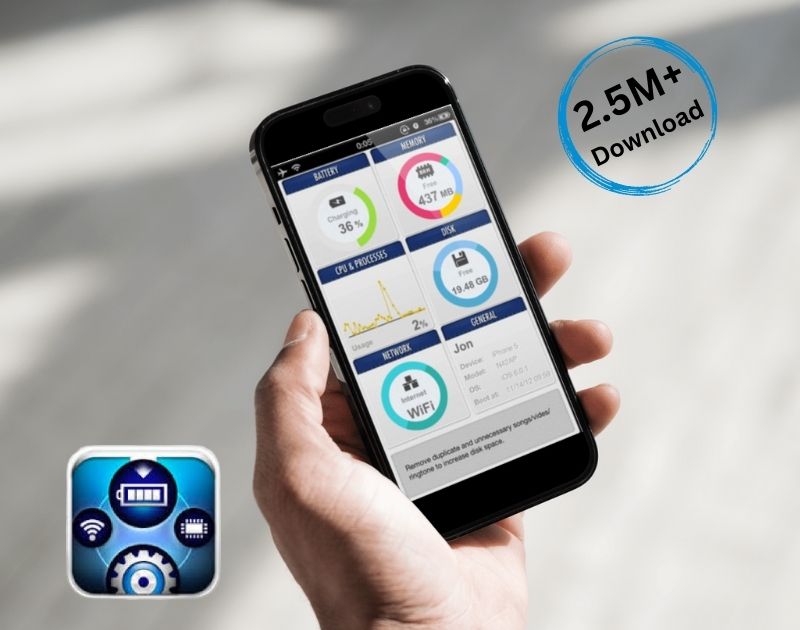
SYSTEM UTIL Dashboard Apps
I would like to introduce a utility app called SYSTEM UTIL Dashboard Apps that can free up your memory of your iPhone or iPad,
SYS Activity Manager- Memory, Process, Disk, Battery and Network
App Features
A powerful iOS app designed for iPad and iPhone, providing real-time monitoring of system resources. It offers insights into memory usage, running processes, disk storage, battery status, and network performance. With a clean and intuitive interface, users can easily track their device’s health and optimize performance. Whether for tech enthusiasts or professionals, this app ensures efficient system management at a glance. I was able to free up memory from 191MB to 256MB.
Developing Process
1. Integrating UI:
- We created a functional prototype with the expertise of our highly experienced UI/UX designers, ensuring a seamless and user-friendly experience.
- Figma was used for designing the UI, allowing for precise prototyping and smooth design implementation.
2. Development:
- The development process focused on performance optimization and a smooth user experience.
- It was built with efficiency in mind, ensuring responsive and intuitive interactions.
3. QA:
- To ensure a flawless user experience, rigorous testing was conducted across multiple devices.
- We performed functional testing, performance testing, and usability testing to identify and fix any issues.
- This thorough QA process ensured that the app met high standards of reliability, accuracy, and efficiency.
Challenges
1. Real-time Data Monitoring & Performance Optimization:
- One of the biggest challenges was efficiently fetching real-time system data without affecting device performance.
- We had to optimize data retrieval and processing to ensure smooth functionality while maintaining accuracy.
2. iOS System Restrictions:
- Apple imposes strict limitations on accessing certain system resources for security and privacy reasons.
- Finding ways to work within these constraints while still delivering meaningful insights required extensive research and testing.
3. UI/UX Optimization for Different Devices:
- Designing an interface that works seamlessly on both iPads and iPhones was challenging.
- We had to create a responsive UI that adapts to different screen sizes while keeping navigation intuitive.
4. Battery Consumption & Resource Management:
- Since the app continuously monitors system performance, ensuring minimal battery consumption was crucial.
- We had to optimize background processes and limit unnecessary resource usage to prevent excessive battery drain.
5. Ensuring Accuracy & Data Consistency:
- Gathering system information accurately across different iOS versions and device models required thorough testing and fine-tuning to prevent inconsistencies in the displayed data.
6. App Store Compliance & Security Considerations:
- Apple’s App Store has strict guidelines for system monitoring apps.
- We had to carefully design features to comply with Apple’s policies while maintaining the app’s core functionality
Technology Stack
- Figma
- Flutter
By overcoming these challenges, we successfully built a high-performance system monitoring tool that provides users with valuable insights into their device’s health.