OBS Blur Filter
In the fast-paced world of live streaming, one accidental leak of a password, email, or private message can ruin a creator’s reputation overnight. Yet most OBS blur tools are clunky, static, and force you to stop the action just to hide something. Enter EF-Blur Filter—the first OBS plugin that lets you instantly pixelate any part of your stream with a single click of your mouse. Designed for macOS and built for speed, EF-Blur turns your cursor into a privacy superpower, keeping your broadcasts safe without ever breaking the flow.
The Problem
Live streamers often need to hide sensitive information—like passwords, emails, or private messages—on the fly. OBS’s built-in blur tools are static: you either pre-define a region or manually move it, which is slow, clunky, and breaks the flow of your broadcast. No existing filter lets you instantly pixelate any area just by clicking where your mouse is.
Our Solution: EF-Blur Filter
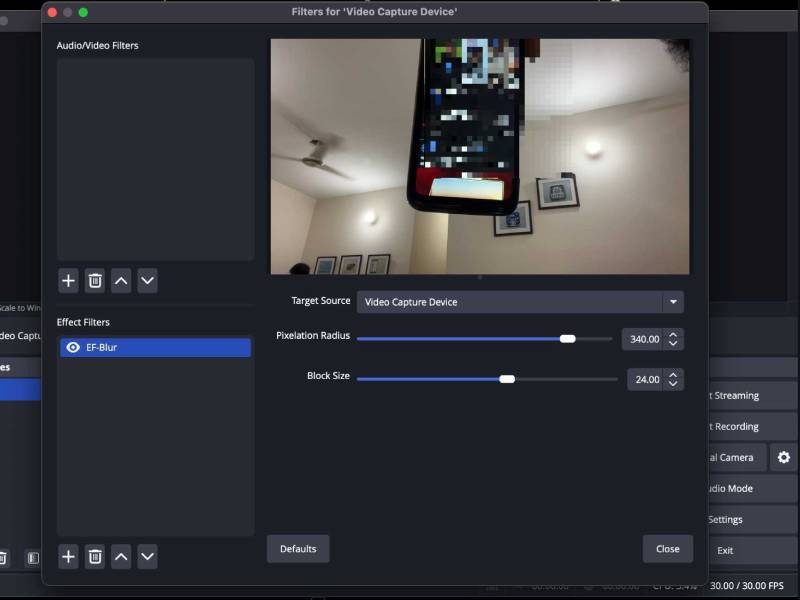
EF-Blur is a lightweight, high-performance OBS plugin that brings real-time, mouse-controlled pixelation to your streams. Click anywhere on a source and an adjustable pixelation square instantly appears under your cursor—perfect for quickly censoring pop-ups, chat messages, or accidental screen shares without ever pausing or disrupting your audience.
How It Works
- Real-Time Mouse Tracking
- Tracks global mouse position and left-clicks even when OBS is not in focus
- Automatically maps screen coordinates to any source (game capture, webcam, browser, etc.)
- Handles window movement, scaling, and full-screen modes flawlessly
- Powerful Pixelation Engine
- Custom GLSL shader runs entirely on the GPU for zero lag
- Square pixelation zone with configurable radius (10–400 px)
- Adjustable block size (2–40 px) for fine or heavy censorship
- Native OBS Integration
- Appears as a standard filter—no extra windows or hotkey spam
- Works on every source type
- Tweak radius and block size live during your stream
Development Highlights
- Built with OBS Studio Plugin API and macOS Carbon/CGEvent frameworks
- Precise coordinate transformation system handles OBS window offsets and scaling
- Optimized rendering pipeline using gs_texrender_t
- Thoroughly tested across resolutions and source types for rock-solid performance
Key Features
- Instant activation: One left-click = one pixelation zone
- Multiple zones: Click again to add more censored areas
- Fully adjustable: Change radius and block size in real time
- Ultra-low overhead: GPU-accelerated shader keeps FPS untouched
- macOS-native (Windows & Linux versions in development)
Installation & Usage
- Download the plugin
- Drop it into your OBS plugins folder
- Restart OBS
- Add → Filter → EF-Blur Filter to any source
- Click anywhere on the source to censor—adjust settings live
What’s Coming Next
- Full Windows & Linux support
- Multiple simultaneous zones with individual controls
- Circular/rectangular shapes
- Fade-in/fade-out animations
- Keyboard shortcuts and preset saving
EF-Blur Filter gives streamers the privacy super-power they’ve been missing: instant, precise, and effortless censorship that moves with your mouse.
Say goodbye to awkward pauses and static blur boxes—protect your content in real time, without ever breaking immersion.
Download EF-Blur Filter today and take control of your stream’s privacy like never before.
Conclusion
EF-Blur Filter isn’t just another blur tool—it’s a game-changer for every streamer who values privacy and professionalism. With real-time mouse tracking, GPU-accelerated pixelation, and seamless OBS integration, you can now censor sensitive information in the blink of an eye, no pauses, no awkward workarounds. Whether you’re a full-time broadcaster or just sharing your screen with friends, EF-Blur gives you total control over what your audience sees.
Download EF-Blur Filter today, click once, and stream with confidence tomorrow. Your privacy deserves nothing less.