LoopTube
LoopTube App
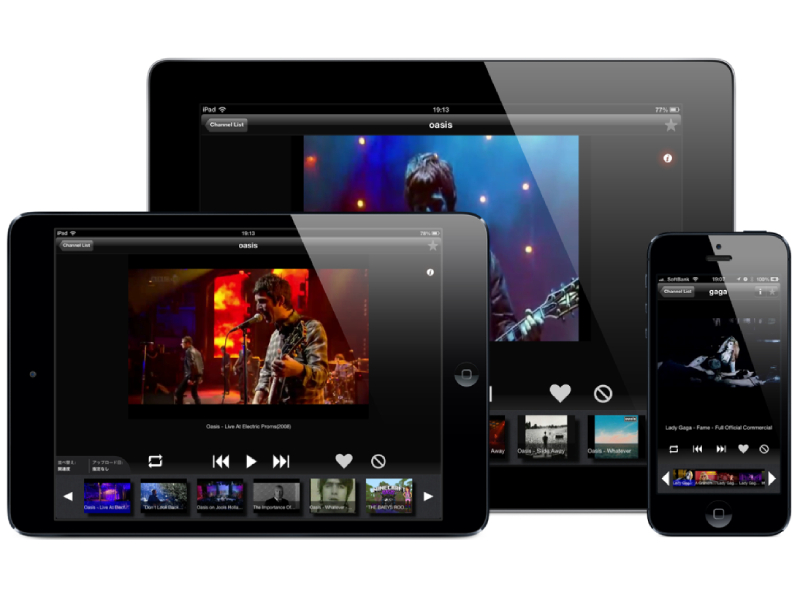
LoopTube App allows users to search for and play YouTube videos continuously in a loop. As a result, this app eliminates the need for users to manually press “next” or “fullscreen” buttons, thus providing a seamless and hands-free video viewing experience. Whether for music, entertainment, or educational purposes, LoopTube significantly enhances the convenience of watching content by keeping it running automatically.
App Features
1. Video Search & Playback:
- In LoopTube, users can search for videos or playlists from YouTube directly within the app.
- Once a user selects a video, the app automatically begins playing it and subsequently continues to the next video in the playlist without requiring any user interaction.
2. Loop Functionality:
- Supports the looping of single videos or entire playlists, providing a continuous playback experience.
- Customizable loop settings to suit user preferences, such as loop a single video or the entire playlist.
3. Autoplay:
- After the current video ends, the app automatically plays the next video in the queue, ensuring a seamless viewing experience without interruptions.
4. Fullscreen Mode:
- After the current video ends, the app automatically plays the next video in the queue, ensuring a seamless viewiThe app automatically switches to fullscreen mode without the need for manual input, providing an immersive video-watching experience.
5. User Interface (UI):
- Simple and intuitive interface that allows users to easily search for videos, control playback, and manage video queues.
- Responsive video controls that support gestures such as pausing, skipping, and adjusting volume.
6. Cross-Platform Compatibility:
- LoopTube App supports both Android and iOS platforms, ensuring accessibility to a wide user base.
7. Offline Functionality (Optional):
- The app lets users download specific videos for offline viewing, and they can play them in a loop without requiring an internet connection.
Development Process
1. Requirement Analysis:
- In the initial phase, we identified the core features for the app, focusing on continuous video playback, autoplay, and seamless looping.
- The team gathered user feedback to ensure the app provides an intuitive and enjoyable experience.
2. Design & Prototyping:
- A clean, user-friendly interface was designed to allow users to quickly search for videos and access looping features.
- Prototyping was done using tools like Figma to visualize the app flow and ensure an easy navigation experience.
3. API Integration:
- The YouTube Data API was integrated to fetch video details, search results, and playlists, allowing users to access a wide range of content from YouTube.
- The app handles authentication via OAuth to securely interact with YouTube’s services.
4. Development:
- The application was developed for both Android (Java/Kotlin) and iOS (Swift) platforms.
- The primary focus was on optimizing the video player to handle seamless transitions between videos and ensure smooth playback in a loop.
5. Testing & Quality Assurance:
- Extensive testing was carried out to ensure seamless video playback, user interaction, and performance.
- The team conducted beta testing to gather real-world user feedback and refine the app’s functionality.
Challenges
1. YouTube API Limitations:
- The YouTube Data API has certain rate limits and restrictions that posed challenges in ensuring smooth video retrieval and playback in real-time.
- We had to carefully manage API calls to avoid hitting limits and ensure uninterrupted video streaming.
2. Video Playback Optimization:
- Ensuring smooth transitions between videos and preventing buffering issues during autoplay required extensive testing and optimization, especially for users on slower network connections.
- Implementing an efficient video caching mechanism to reduce buffering and improve the overall user experience.
3. Cross-Platform Development:
- Ensuring that the app worked seamlessly on both Android and iOS required careful attention to platform-specific differences, especially when handling video rendering and UI consistency.
- Testing was more complex due to the need to ensure the app functioned similarly across multiple devices and operating systems.
4. User Interface Challenges:
- Designing an intuitive, simple UI for continuous video playback while keeping the interface uncluttered was challenging.
- We focused on ensuring that the app’s core functionality was easily accessible, and that users could quickly start looping their videos with minimal effort.
Technology Stack
1. Programming Languages:
- Android: Java and Kotlin for native Android development, focusing on performance and integration with the YouTube API.
- iOS: Swift for developing the iOS version, ensuring smooth interaction with the YouTube Data API and video player controls.
2. YouTube API:
- Integrated YouTube Data API to fetch video information and manage playlists, enabling search, playback, and autoplay functionalities.
3. Video Playback Framework:
- Utilized the ExoPlayer library for Android and AVPlayer for iOS to handle video streaming and playback efficiently.
4. Cross-Platform Tools:
- For certain aspects of development, we used Firebase for user authentication (OAuth) and cloud storage (for offline features), ensuring seamless cross-platform data synchronization.
5. UI/UX Design Tools:
- Figma was used for wireframing and prototyping the user interface.
- The UI design focused on minimizing user actions while maximizing functionality, ensuring a smooth user experience.
6. Testing Tools:
- JUnit and Espresso were used for unit and UI testing on Android.
- XCTest and UI Testing were used for the iOS version to ensure the app performed as expected across a range of devices.